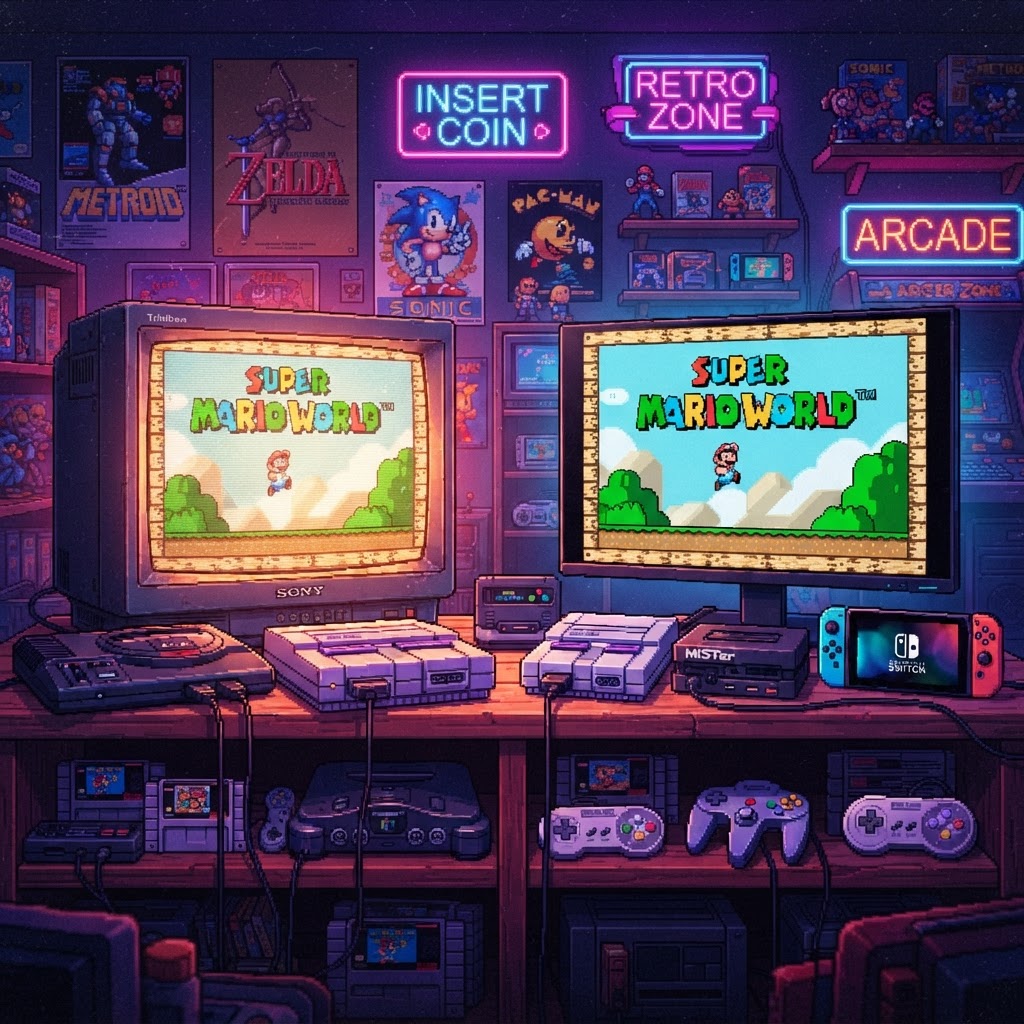
Why the CRT Question Still Matters in 2025
Ask any serious retro gamer what their biggest display headache is and the answer is almost always the same: "I miss my CRT." Cathode ray tube televisions were the intended canvas for virtually every console from the Atari 2600 through the PlayStation 2 era. Scanlines, natural color bleeding, near-zero input lag, and the way phosphor glow softened pixel edges — these weren't flaws. They were features baked into how game artists designed sprites and backgrounds.
The problem? Good CRTs are increasingly scarce, heavy, bulky, and prone to failure. A pristine Sony Trinitron or PVM professional monitor now commands serious money on the secondhand market. So the retro gaming community has spent years asking a genuinely hard question: Can modern alternatives actually replace a real CRT, or are they always a compromise?
The honest answer is: it depends on what you value most. Let's walk through every serious option.
The Original CRT: Still the Gold Standard (With Caveats)
A real CRT — especially a consumer Trinitron or a professional PVM/BVM — delivers something no current flat panel fully replicates. The electron beam draws each frame line by line, producing the authentic scanline structure that retro game artists designed around. Colors are warm and saturated without configuration. Input lag is essentially zero.
But here's the reality check:
- A quality 20-inch PVM can cost $300–$800+ today, up from near-zero a decade ago.
- Consumer CRTs above 27 inches weigh 80–120 lbs and require two people to move safely.
- Convergence drifts, flyback transformers fail, and finding a repair technician is increasingly difficult.
- Most modern homes don't have space for a dedicated CRT setup.
If you have a working CRT and the space for it, keep it. But if you're building a new setup from scratch, the math has changed significantly.
Modern Alternatives: A Tier-by-Tier Breakdown
Tier 1: HDMI Upscalers and Adapters (Best Value for Most Gamers)
For the majority of retro gamers, the smartest move is pairing original hardware with a quality upscaler or adapter to feed a modern flat panel. Done right, you get low input lag, sharp pixels, and a setup that fits in any living room.
The key is using the best signal path your console supports. Composite is the worst option — S-Video is a massive upgrade for systems that support it (Super Nintendo, N64, original PlayStation). For that upgrade, a quality S-Video to HDMI Adapter is one of the most cost-effective purchases you can make. The difference between composite and S-Video on a SNES is genuinely shocking.
For consoles that only output RF (think Atari 2600, ColecoVision, early Famicom), a Multi-Console RF to HDMI Adapter cleans up signal noise considerably and makes these ancient systems usable on any modern TV without a dedicated CRT.
If you have multiple consoles and want a single-solution approach, a dedicated Retro Console HDMI Converter handles composite, S-Video, and sometimes component in one box — a strong choice for collectors running five or more systems.
Verdict vs. CRT: You lose authentic scanlines and some of the phosphor warmth, but you gain convenience, reliability, and compatibility with any screen in your house. For 90% of players, this is the right call.
Tier 2: CRT Shaders and Filters on Modern Hardware
If you're running retro games via emulation — whether on a Raspberry Pi, a MiSTer FPGA, or a PC — CRT shader filters like CRT-Royale or CRT-Geom are remarkably convincing on a good 4K panel. These shaders simulate scanlines, phosphor masks, bloom, and even the slight curvature of a CRT screen.
The honest limitation: Shaders running on emulation can introduce processing overhead, and purists correctly point out that even the best shader on a flat panel doesn't replicate the physical light emission of phosphor. But for casual and even serious retro gamers who aren't pixel-counting, shaders on a well-calibrated 4K OLED are genuinely impressive.
Verdict vs. CRT: Shaders are the best visual approximation short of real hardware, especially on high-resolution panels. Input lag depends entirely on your display's game mode performance.
Tier 3: Dedicated Retro Displays (Upscaling Monitors Designed for Gaming)
Products like the Analogue 4K HDMI cables for their consoles, or gaming monitors specifically marketed for retro use, occupy an interesting middle ground. Pair these with a high-quality upscaler (like the OSSC or RetroTINK 5X Pro) and you're getting very close to CRT quality with modern reliability.
These setups cost more upfront — a RetroTINK 5X Pro alone runs $200+ — but they represent the enthusiast's answer to the CRT question: keep original hardware, upgrade the display chain.
The Setup Details That Make or Break the Experience
Keep Your Hardware Clean
None of this matters if your cartridges are dirty. Before you even think about display options, a Game Cartridge Cleaning Kit is non-negotiable. Oxidized pins introduce visual glitches that no upscaler can fix, and regular cleaning extends cartridge life significantly.
Similarly, if you're sourcing vintage hardware to pair with your new display setup, opening consoles for inspection or recapping requires security screws — a Console Screw Bit Repair Tool Set handles the proprietary fasteners on Nintendo, Sega, and Sony hardware that standard screwdrivers can't touch.
Ergonomics Matter for Long Sessions
Here's something rarely discussed in CRT alternative guides: once you've solved your display situation, your seating matters enormously. Retro gaming sessions run long, and a dedicated Retro Gaming Recliner Chair positioned at the right distance from your screen is the difference between a two-hour session and a six-hour one.
Modern Recreations vs. Original Vintage Hardware: The Verdict
| Factor | Original CRT | Modern Alternatives | |---|---|---| | Visual authenticity | ✅ Best possible | ⚠️ Very good with upscalers/shaders | | Input lag | ✅ Zero | ✅ Low on good displays/adapters | | Reliability | ❌ Aging hardware | ✅ New, warrantied | | Cost | ❌ Rising fast | ✅ Accessible | | Space/weight | ❌ Problematic | ✅ Minimal | | Setup complexity | ✅ Simple | ⚠️ Moderate |
If you already own a working CRT: Use it. It's irreplaceable.
If you're starting fresh: A quality upscaler with S-Video or component input feeding a good gaming monitor gives you 85–90% of the CRT experience with 100% more practicality.
Conclusion: The Best CRT Is One You'll Actually Use
The retro gaming community sometimes treats CRTs with almost religious reverence — and the image quality genuinely earns some of that reputation. But the best display is the one that gets your consoles out of storage and into regular use. Modern adapters and upscalers have reached a point where the gap between "authentic" and "practical" is smaller than ever.
Start with the signal chain: grab an S-Video to HDMI Adapter for your 16-bit consoles today, and you'll immediately understand why the display conversation matters so much — and why the modern options are finally worth taking seriously.